How To Edit Any Website Using JavaScript?


Hey everyone, on some user request I wrote about How to Enable Hidden Offline Browsing In Google Chrome last time. And as expected, I got messages in our inbox. There were many people asking me to write on different topics and some of them were asking for some tutorial about some funny trick and all.
There was this one guy who asked me about how he can edit any website like Facebook or Google just for fun.
Although I am not an excellent coder, but this was a nice little hack my friend showed me once. I wanted to share the same with you and I agree that many of us already know this trick. So here it is!
Step 1: Open webpage you wish to edit
Open the page you wish to edit. Here I am going to edit my Facebook page.

Step 2: Copy JavaScript code in the URL box
Now copy and paste this code in URL box of the same page.
javascript:document.body.contentEditable=’true’; document.designMode=’on’; void 0
Step 3: Select/change text and edit website
Now you can edit any text on that webpage. Select/change the text and number you wish to change and there you have it! :D
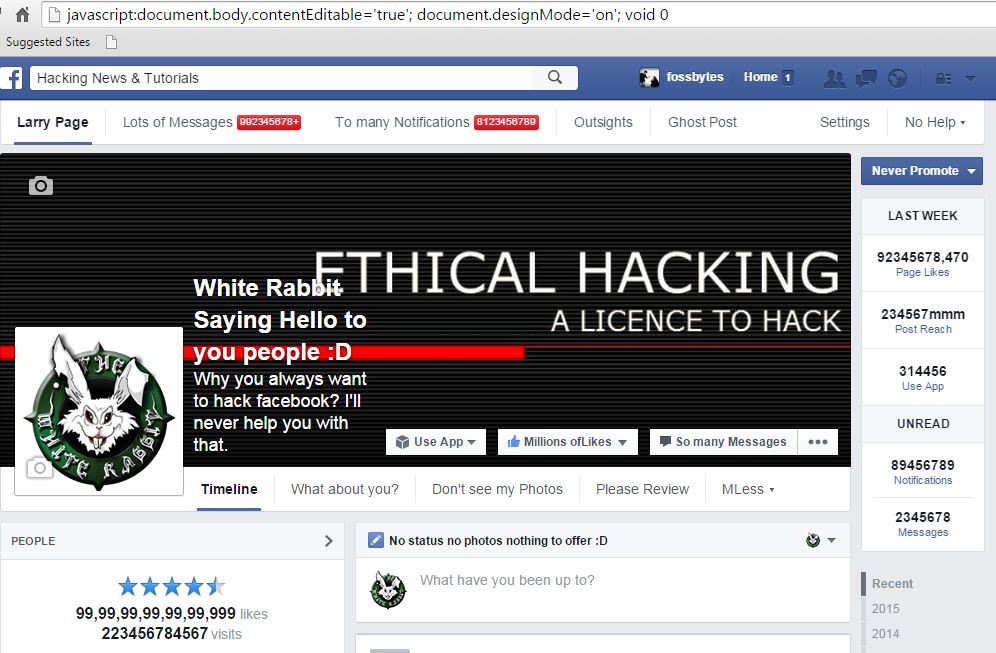
See how I changed my page’s name, how I manipulated the likes, status bar, and everything. It’s kind of awesome.
Step 4: Use it for editing Facebook page for fun
Apart from changing random stuff, you can also change your friends profile on Facebook, chats and share them with others to have a little bit of healthy fun!
Note:
- While pasting the code in URL box, make sure that “javascript:” is included at the front.
- The changes will be only on client side not server side.
Also know: How to Build a Website – A Complete Guide
You can send us some pictures of your playing around with the code. We’ll embed that at end of the post. Enjoy ;)
See Our How To Guides for more tips and Tricks.